Use Flip Finder
Find sell offers within your budget and compare them with buyer offers. Check with both players before arranging a trade.
Your plan must include Flip Finder access.
Set your filters
-
Choose Resale ideas
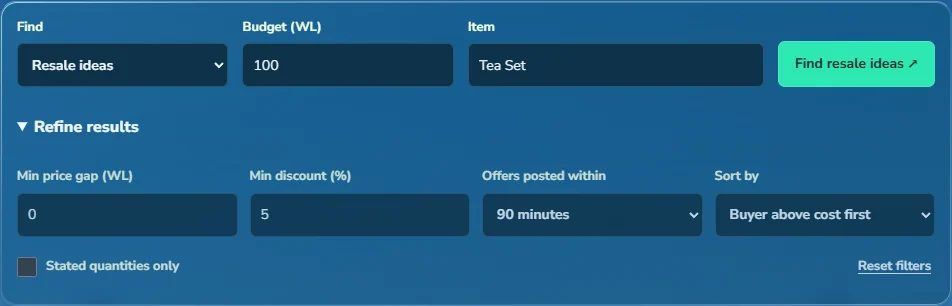
Flip Finder opens with Buyer/seller matches. Under Find, choose Resale ideas and enter your budget. Open Refine results to adjust the minimum price gap, discount and listing age. The starting settings are 0 WL, 5% and 90 minutes.
-
Choose an item or search all items
Enter an item name, such as Tea Set, or leave Item blank to search all items. Select Find resale ideas.
 View full size
Check a result
-
Compare the buying and selling prices
The buyer spread is the difference between the purchase price and the best buyer offer found. A negative spread means that buyer offers less than you'd pay. No buyer means no matching buyer offer was found. By default, results with a buyer above the purchase cost appear first.
-
Read the original offers
Expand View offers & check trade to open the seller's and buyer's posts. Confirm the quantities, units and availability. Comparison posts shows other sellers' asking prices, which may be higher than buyers will pay. Select Refresh to check for updated results.
-
Calculate the potential profit
Open Check this trade and enter the quantity, buying price, selling price, extra costs and desired profit. The calculator shows your profit if all items sell, the sale price needed to break even and the most you can pay to meet your target. You can use its alert links to fill in a draft alert, then review and save it.
Example: comparing asking prices
Buying at 3 WL is 40% below the other sellers' median of 5 WL. That doesn't mean a buyer will pay 5 WL. Check buyer offers and ask the seller how much stock is available.
Find buyer and seller matches
Under Find, choose Buyer/seller matches, then select Find flips. This finds buyers offering more than another account's selling price. Open both posts and contact both players to check that the offers are still available.
Discount or margin: what is the difference?
Discount compares the price difference with the other sellers' median. The tool's margin compares the potential gain with your buying cost. If you buy at 3 WL and sell at 5 WL, the discount from 5 WL is 40%, while the gain on your 3 WL cost is about 66.7%.
No results?
How can I broaden the search?
Try clearing Item, reducing the minimum discount or price gap, or setting the listing age to 90 minutes. Keep the budget within what you want to spend. If no listings match, check again later.
What does Stated quantities only do?
It shows only offers that specify a quantity, so you can compare the cost of whole lots. Leave it off to include per-item prices where stock is unknown.
Check a trade you found yourself
Open Check your own trade in Flip Finder, even if no matches appear. Enter the quantity, purchase price and sale price. Choose Items per WL for prices such as 200/WL; choose WL, DL or BGL for a price per item.
Add other costs and your profit target in total WL. The result shows your spending, profit if the full quantity sells, break-even sale price and the most you can pay to meet your target. Confirm the stock and buyer yourself before trading.
Your draft stays in this tab when you refresh or return from an item page. Select Clear trade to start again. Nothing is recorded as a purchase.
Updated 30 September 2026.
