Use the quest planner
Check quest requirements, estimate the cost of supplies you still need, and save your progress.
You can view today's Daily Quest without an account. Check your plan's access to the quest planner. Saving a quest requires a verified account.
Plan your Daily Quest supplies
-
Read today’s quest
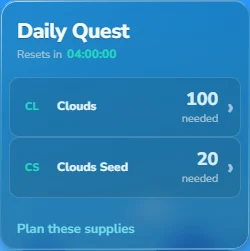
Open Daily Quest on Home and check the required items, quantities and reset time. If the requirements aren't available yet, check again later.
-
Enter what you already have
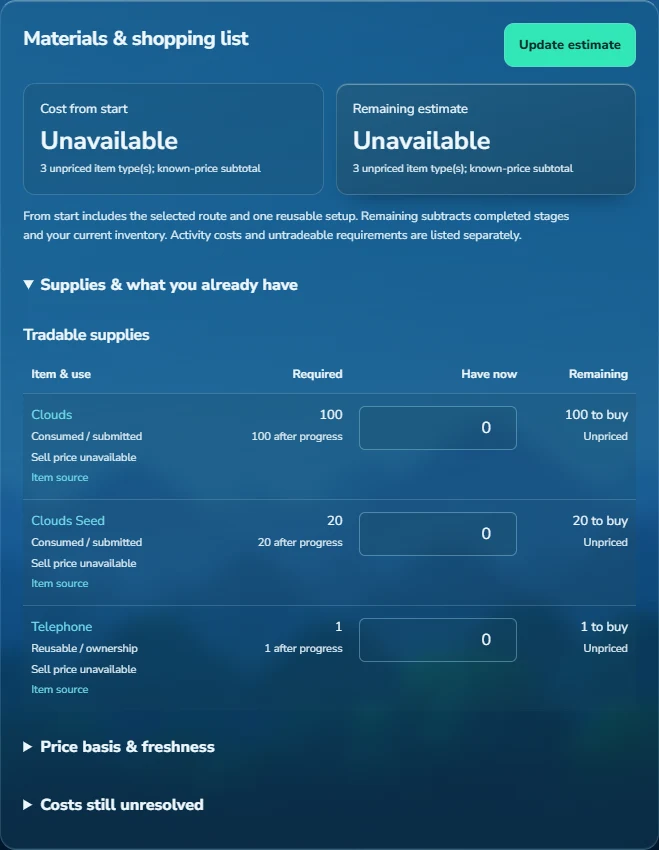
Select Plan these supplies, then open Supplies & what you already have. Enter your quantities under Have now and select Update estimate. If you already have access to a telephone, enter one for telephone access.
-
Check the remaining items
Open each item's recent WTS listings and check with the seller that enough stock is available. Make sure you choose the required item or seed.
 View full size
Example: subtract the supplies you already have
Suppose a quest needs 100 Clouds and 20 Clouds Seed. If you already have 40 Clouds and 5 seeds, you need to buy 60 Clouds and 15 seeds.
Save a supply list
-
Choose a basket
Select Choose basket and choose an existing basket or enter a name for a new one.
-
Review and save
Check the basket and select Save materials. Items already in that basket keep their quantities and recorded purchases.
Track a longer quest
-
Choose a reward
Open Explore quests and search for a reward or filter by quest type. Select a quest to see its requirements, source links and any event or waiting periods.
-
Adjust the plan
Mark stages you've completed, choose between any alternative requirements and enter the supplies you have now. Supplies spent on completed stages are removed from the estimate. Reusable items, such as a telephone, are counted once.
-
Save a quest
Select Start this quest. You can then update the quest under My quests. Select Save progress after changing steps, inventory, assigned tasks, spending or notes.
 View full size
Spending and quest changes
Where should I record spending?
Record each expense in one place: a step's Spent (WL) field, its linked basket or Other spending. Leave unknown prices blank and use zero only for free supplies. Use a separate basket for each quest, and update Have now when your inventory changes.
What changes after the Daily Quest resets?
If you're exploring a plan that includes the Daily Quest, refresh it after the reset. A saved quest keeps the requirements you started with. Mark it completed after you claim the reward.
Which costs cannot be predicted?
Enter altar riddles and Ringmaster delivery requirements when they're assigned. Random tasks, surgery supplies, yields and waiting periods can prevent a complete estimate. Untradeable requirements aren't included in the WL total. Check the quest's source links for details.
How do unlocks and upgrades work?
Marvelous Mission estimates include each unlock mission once; mark any unlocks you've already completed. Ancestral quests start with the base artifact. Open its details to choose upgrades, or use Profit Hub to estimate crafting the base artifact.
What happens when I remove a quest or basket?
Removing a quest tracker leaves its basket and purchases in place. Removing a linked basket takes those purchase costs out of the quest total. Items no longer in the catalogue are skipped when reviewing a basket.
Can I use quest supplies for resale research?
Yes, but check recent buy offers and the reset time before buying stock. A quest requirement doesn't guarantee you'll find buyers for the supplies.
Updated 27 September 2026.
