Set up Ad Manager
Add the items you're selling, preview your ads and choose when they are sent to iHemo, the Discord server used by Ad Manager.
You'll need a verified email, Ad Manager access and desktop Chrome to connect your account.
Before connecting
Your profile's Discord account link is used for notifications and payment identity. Ad Manager uses a separate posting connection. A connected Ad Manager can still show “Not linked for notifications” in your profile.
Connect your account
-
Review the connection
Select Set up Discord. Only use a token you already hold for your own account. Do not install token-copying extensions or run pasted browser scripts.
-
Confirm your account
Open Discord and check your account name. Select I have my own token when you are ready. Tradetopia cannot fetch your Discord token.
-
Save the connection
Paste your token into Discord account token and select Save connection. Your password and price-alert linking code are not tokens.
Add an item for sale
-
Choose an item
Go to Selling items → Add a selling item. Search for the item you're selling and select it.
-
Enter the sale details
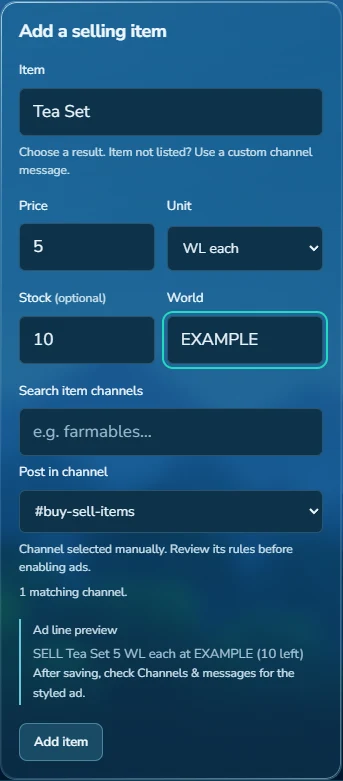
Enter the Price, Unit and World, then choose Post in channel. Add Stock if you want to include the quantity available.
-
Read the preview
Check the Ad line preview and select Add item.
 View full size
Check the price unit
Ten Tea Sets at 5 WL each cost 50 WL in total. Stock is the quantity available, not the price.
20 Items per WL means 20 items for one WL, not 20 WL each.
Start or pause sending
-
Review the channel message
Open Channels & messages and expand the editor for your channel. Check its rules, message limits and preview, then save any changes.
-
Enable the channel and start sending
Turn on Enable channel for each destination you want to use, then select Resume sending. Each channel must still wait for its cooldown.
-
Keep stock up to date
After a sale, update the stock or turn Selling off. Ad Manager can't detect in-game sales. Select View delivery activity or the Activity tab to see delivery results.
Troubleshooting
The connection fails or my token says NULL
NULL is not a token. Select Update token to review the connection steps. Use only your own complete Discord account token. Your password and notification linking code cannot connect Ad Manager.
Discord says I cannot access or post in a channel
iHemo is the Discord server where Ad Manager posts ads. Open the channel link above your ad and check that the same Discord account can access it. Review iHemo's ad rules in Discord. Connecting a token or enabling a channel does not grant server access.
Why is an ad waiting or paused?
Check that sending is resumed, the channel is enabled, its cooldown has ended and you have messages left in your allowance. Item-generated ads also need at least one item. Read any error or site-wide pause notice shown on the page.
Why does the message wording change?
Generated ads vary their headings, wording and emoji. The preview shows the next message. Formatting may be shortened to fit the channel's limit. If you write a custom message, your text is kept.
What happens when I remove a channel?
Select Remove channel and confirm to stop future ads and clear that channel's items and drafts. Delivery history and cooldowns remain, even if you add the channel again. Clearing Activity doesn't reset a cooldown.
Updated 27 September 2026.
